Configuration
Sonar Webhooks Setup
Setup
The Sonar plugin allows to receive Sonar analyses that can be sent by SonarQube or SonarCloud via webhooks. For this purpose, the plugin provides two REST endpoints to evaluate the analysis result of the webhooks and attach it to the analysed commit in the repository. The setup of the webhooks should hardly differ in the tools.
SonarCloud Webhook
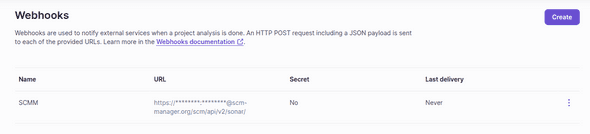
In SonarCloud webhooks can be defined per project or per organization. The webhooks are triggered automatically after running an analysis, regardless of the analysis result. The recommended procedure for setting up Sonar webhooks against the SCM Manager server is presented here.
Example
We set up a new webhook for our Sonar project. For this we choose as URL the endpoint in SCM-Manager: https://{instanceUrl}/scm/api/v2/sonar.
For this webhook to be accepted at the SCM manager, credentials must be sent along.
This usually involves choosing a technical user who must have the rights to write CI statuses.
Username and password can be written in the front part of the URL, e.g. https://Testuser:Password123@{instanceUrl}/scm/api/v2/sonar.
Instead of the password we can also use a SCMM API key.
The payload of the Sonar webhook is automatically generated from the analysis data.
In order for the SCM-Manager to recognize which repository it is when it receives the webhook, the repository name must be supplied with the special key sonar.analysis.scmm-repo.
The value of the key must contain {repositoryNamespace}}/{repositoryName}}.
Example of triggering a SonarCloud analysis:
sonarqube -Dsonar.organization=scm-manager -Dsonar.branch.name=develop -Dsonar.analysis.scmm-repo=scm-manager-plugins/scm-tagprotection-plugin
For more information on Sonar webhooks, see the documentation.