Mirror configuration
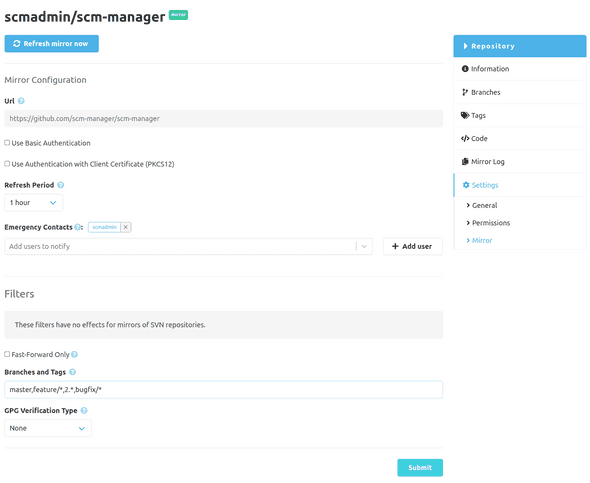
If a repository was created as a mirror, there is a mirror configuration. Besides the possibility to trigger an immediate synchronization 1 of the repository the credentials, the synchronization interval, and the filters can be changed with this dialog.
Additional to the time of the creation there is a configuration for "Emergency Contacts". These are users who will get a notification whenever the status of a mirror synchronization has changed.
The details for the other settings can be found in the documentation for the creation.
The button in the yellow-bordered area below can be used to start an update together with a check for LFS files in the complete repository. In this case, the LFS files will be synchronized even if they had been configured to be ignored for the repository.

In the red-bordered area below, the mirroring can be finally terminated via the Unmirror Repository action.
As a consequence, the repository will no longer be updated from the external source and the repository can be edited directly.
Once a mirroring has been terminated, this repository can no longer be converted into a mirror!

Global Configuration
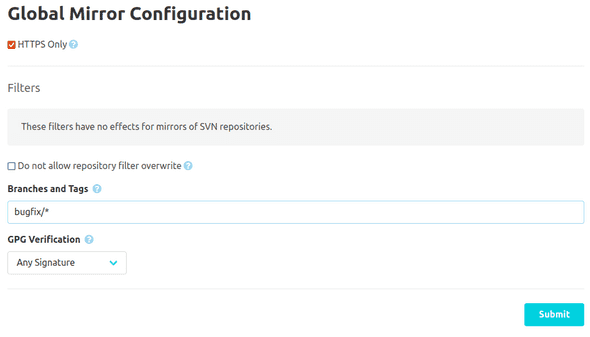
Further settings are available in the administration settings and default filters can be defined. Additionally, local filter configuration can be disabled.
- Please note, that at most four synchronisations will run in parallel.↩