This page does not refer to the most recent version of this plugin. Go to the latest version of this page.
Overview
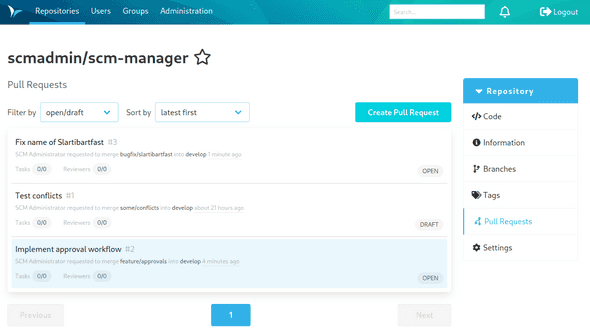
Most of the functions that come with the Review plugin can be found inside each git repository under the tab "Pull Requests". Once the tab is open it shows a list of all pull requests that are open.
The list offers these options:
- open/draft (standard): All pull requests that are open.
- mine: All pull requests that are assigned to the current user.
- to be reviewed: All pull requests that the current user is supposed to review.
- all: All pull requests.
- rejected: All pull requests that were rejected.
- merged: All pull requests that were accepted.
The sorting can be adjusted through an additional selection element. The overview list shows the following information per repository:
- Title (name of the pull request set by the author)
- Creator/author of the pull request
- Source branch (branch that contains the changes / source)
- Target branch (branch where the changes should be applied / target)
- Creation date or age of the pull request
- Number of open and total tasks for the pull request
- Number of reviewers and number of approvals
- Status of the pull request (Open, Draft, Merged, or Rejected)
- Status of the workflows defined for the repository
Additionally, other plugins can add more data, such as CI analyses.